01
Click on "Add New Tenant"
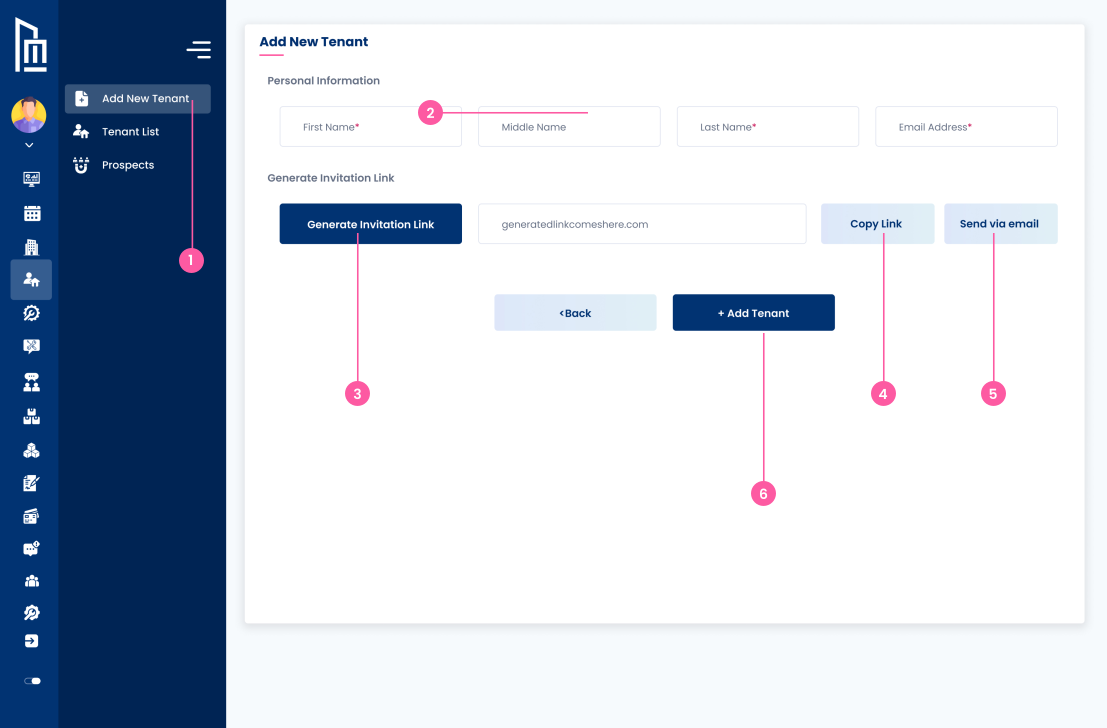
Navigate to the "Add New Tenant" section by clicking on the "Add New Tenant" tab in the sidebar.
Follow the steps below to complete this action inside Marafiqy.
Navigate to the "Add New Tenant" section by clicking on the "Add New Tenant" tab in the sidebar.
Enter the tenants first name, middle name, last name, and email address in the given fields.
Click on "Generate Invitation Link" to create a link for the tenant.
After the invitation link is generated, click on "Copy Link" to copy the generated link.
Alternatively, click on "Send via email" to send the link directly to the tenants email address.
After filling in the required information and generating the link, click on the "+ Add Tenant" button to complete the process.