01
Clicking "New Income"
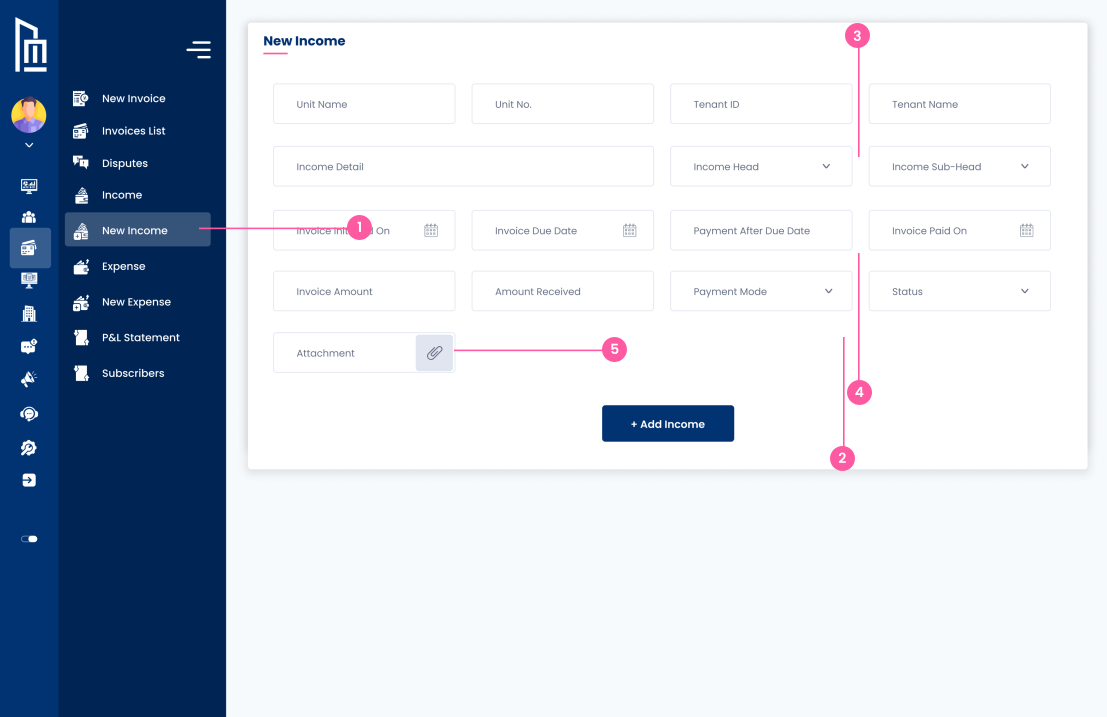
The owner clicks the "New Income" link in the sidebar menu to open the form for manually recording revenue transactions.
Follow the steps below to complete this action inside Marafiqy.
The owner clicks the "New Income" link in the sidebar menu to open the form for manually recording revenue transactions.
They perform the action of inputting the Invoice Amount, Amount Received, Payment Mode, and the current Status of the payment.
They see and select the proper accounting structure using dropdowns for Income Head, Income Sub-Head, and detailed Income Detail.
They input key dates like Invoice Due Date and Invoice Paid On, and identify the source using Tenant ID and Unit No.
They can perform the action of uploading a supporting document (like a receipt) for the income entry by using the paperclip icon in the Attachment field.