01
Clicking "New Expense"
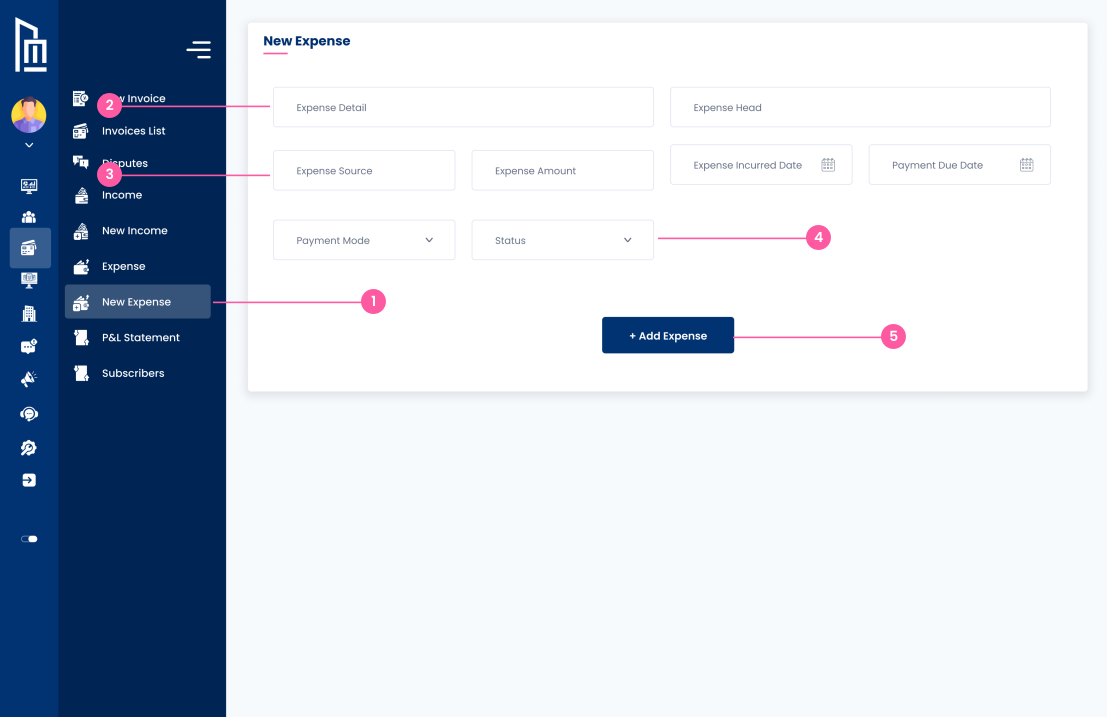
The owner clicks the "New Expense" link in the sidebar to access the form for logging a new outgoing transaction.
Follow the steps below to complete this action inside Marafiqy.
The owner clicks the "New Expense" link in the sidebar to access the form for logging a new outgoing transaction.
They perform the action of inputting the Expense Amount, specifying the Expense Detail, and choosing the main Expense Head.
They input the Expense Source (e.g., vendor name) and the two critical dates: Expense Incurred Date and the Payment Due Date.
They can select the Payment Mode (e.g., Cash, Bank Transfer) and the current Status (e.g., Paid, Pending) using the dropdown menus.
After filling the required fields, they perform the final action of clicking the "+ Add Expense" button to save the new transaction to the expense ledger.